DIY EasyMotion
I tried reimplementing an easy motion style jump feature in neovim and learned that you can do it in just 60 lines of lua.
Rationale
Over a decade ago I used the EasyMotion plugin in Sublime Text. About that time I started toying with vim. The built-in modal editing and navigation features were fascinating so I did not consider looking into easy motion plugins for vim for many years. A decade later I was reminded of EasyMotion and decided to include it for the rare occasions when it is more convenient.
There are plenty of EasyMotion-like options available for neovim. The OGs vim-easymotion and vim-sneak and some of the modern alternatives leap.nvim, flash.nvim, mini-jump2d. I've tried them all and while all work as advertised. None hit that sweet spot. Maybe my memory is hazy or the workflow changed is different now. Some use entire window than the current buffer split, others place labels over the character I want to jump to which breaks my mental flow. As a result, I decided to give it a try to re-implement it myself to my exact liking.
Before we jump into implementation, for extra challenge I wanted to implement it per my memory without verifying if that's exactly how the sublime plugin works. My requirements were to jump to any character on the screen by typing the char to jump to, the next char, and the next char get's highlighted a single label.
For example, if I want to jump to the I, I type I followed by a space. That puts a label on the first letter of the next word. Now you type the label for the I that you want to jump to.
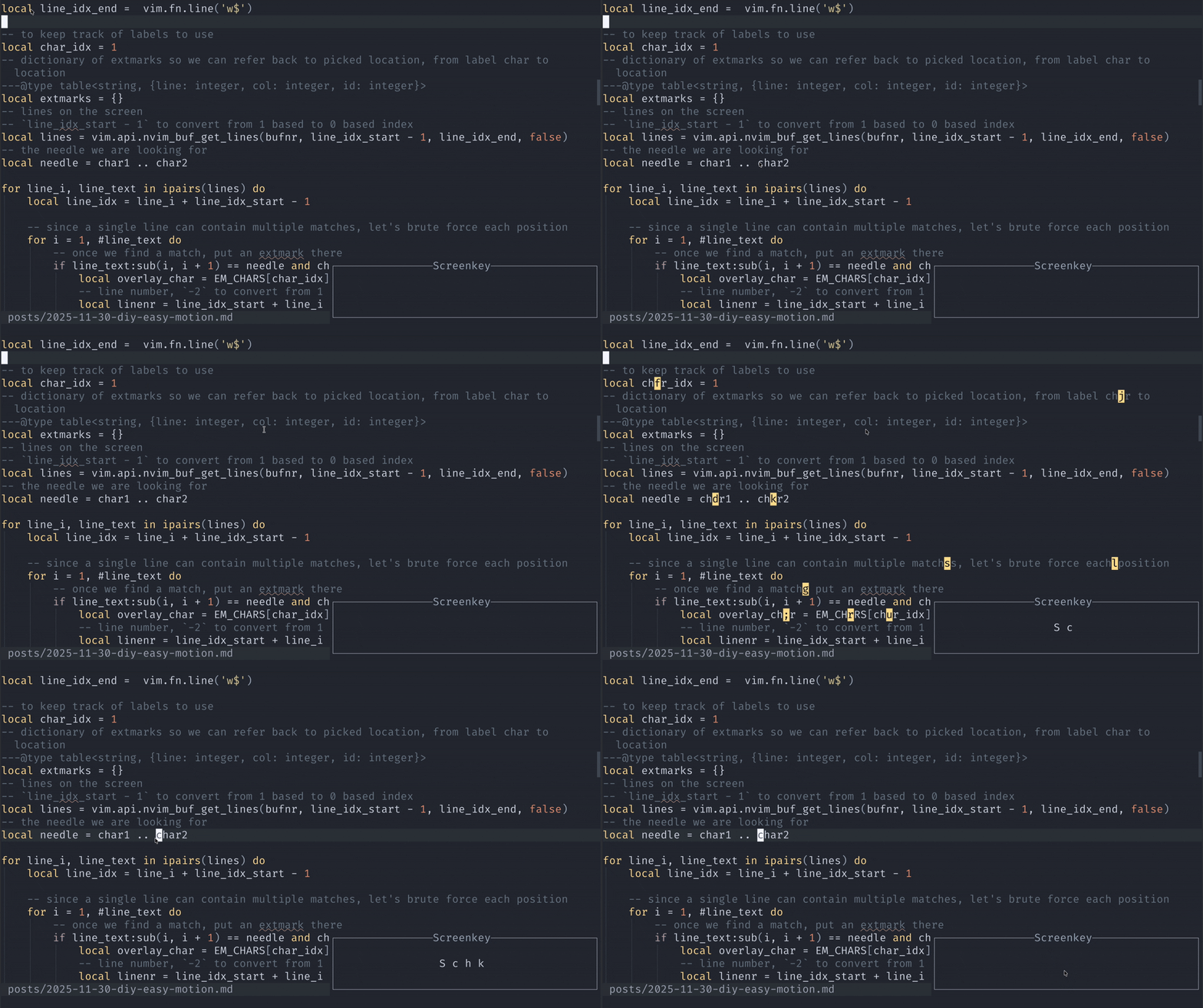
The coolest part is that to implement this yourself you will only need to know about a handful of neovim APIs.
:h getchar()- a way to block editor and get next typed character from user:h extmarks- a way to pin something virtual and display it along the code without modifying the buffer content:h vim.schedule()- schedule a callback to run on the next event loop iteration
Make it work
Now let's go into the implementation
-- namespace for the extmarks. It will make it easier to clean up later
local EASYMOTION_NS = vim.api.nvim_create_namespace('EASYMOTION_NS')
-- Characters to use as labels. Note how we only use the letters from lower
-- to upper case in ascending order of how easy to type them in qwerty layout
local EM_CHARS = vim.split('fjdkslgha;rueiwotyqpvbcnxmzFJDKSLGHARUEIWOTYQPVBCNXMZ', '')

local function easy_motion()
    -- implementation will go here
end

vim.keymap.set(
    { 'n', 'x' }, -- trigger it in normal and visual modes
    'S', -- trigger search on
    easy_motion,
    { desc = 'Jump to 2 characters' }
)
From the requirements we already know how we want to implement the easy_motion function.
- We get 2 characters typed by the user
- Label all the matching positions on the screen
- Listen for user input to pick the location to jump to
- Jump to the location or cancel on any other key
- Clean up the labels
-- 1. Get 2 characters typed by the user

-- since getchar() returns key code, we need to covert it to character string using `nr2char()`
local char1 = vim.fn.nr2char(vim.fn.getchar())
local char2 = vim.fn.nr2char(vim.fn.getchar())
-- 2. Label all the matching positions on the screen
-- To locate characters on the screen, we need the screen boundaries.
-- Buffer content does not always fit on the screen size
-- First line displayed on the screen
local line_idx_start = vim.fn.line('w0')
-- Last line displayed on the screen
local line_idx_end = vim.fn.line('w$')
-- to keep track of labels to use
local char_idx = 1
-- dictionary of extmarks so we can refer back to picked location, from label char to location
---@type table<string, {line: integer, col: integer, id: integer}>
local extmarks = {}
-- lines on the screen
-- `line_idx_start - 1` to convert from 1 based to 0 based index
local lines = vim.api.nvim_buf_get_lines(bufnr, line_idx_start - 1, line_idx_end, false)
-- the needle we are looking for
local needle = char1 .. char2
for line_i, line_text in ipairs(lines) do
local line_idx = line_i + line_idx_start - 1
-- since a single line can contain multiple matches, let's brute force each position
for i = 1, #line_text do
-- once we find a match, put an extmark there
if line_text:sub(i, i + 1) == needle and char_idx <= #EM_CHARS then
local overlay_char = EM_CHARS[char_idx]
-- line number, `-2` to convert from 1 based to 0 based index
local linenr = line_idx_start + line_i - 2
-- column number, `-1` to convert from 1 based to 0 based index
local col = i - 1
-- set the extmark with virtual text overlay
-- We specify the buffer, namespace, position, and options
-- use `col + 2` to position the label 2 characters after the match
local id = vim.api.nvim_buf_set_extmark(bufnr, EASYMOTION_NS, linenr, col + 2, {
-- text we want to overlay the character
virt_text = { { overlay_char, 'CurSearch' } },
-- how to position the virtual text, we use `overlay` to cover the existing content
virt_text_pos = 'overlay',
-- use `replace` to ignore the highlighting of the content below and only use the highlight group specified in `virt_text`
hl_mode = 'replace',
})
-- save the extmark info to jump to it if selected
extmarks[overlay_char] = { line = linenr, col = col, id = id }
-- increment the label index
char_idx = char_idx + 1
end
end
end-- 3. Listen for user input to pick the location to jump to
-- Before block editor to listen for user input, we need to allow neovim to draw the labels.
-- We can user `vim.schedule` to allow neovim to process pending UI updates.
vim.schedule(function()
-- Get the next character typed by the user
local pick_char = vim.fn.nr2char(vim.fn.getchar())
if extmarks[pick_char] then
-- 4. Jump to the location
local target = extmarks[pick_char]
vim.api.nvim_win_set_cursor(0, { target.line + 1, target.col })
end
-- 5. Clean up the labels
vim.api.nvim_buf_clear_namespace(bufnr, EASYMOTION_NS, 0, -1)
end)Make it better
At this point we have all the basics down. There are still a few more improvements we can make
First let's handle concealed lines, no need to put search and label hidden content
-- Make sure we only label visible lines
if vim.fn.foldclosed(line_idx) == -1 then
    -- check line content ...
end
I enjoy smartcase for search using /. Let's make our implementation act similar - enables case sensitivity if needle contains an uppercase character
local needle = char1 .. char2
-- if needle has any uppercase letters, make the search case sensitive
local is_case_sensitive = needle ~= string.lower(needle)

for line_i, line_text in ipairs(lines) do
    if not is_case_sensitive then
        -- for case insensitive search, convert line to lower case so we can match on all content
        line_text = string.lower(line_text)
    end

    -- check line content ...
end
Sometimes you want to go back, <C-o> does just that. We need to support jumplist. We need to add a mark in jump list, we can do it in a single line
vim.cmd("normal! m'")Right now we continue looking for matches even after we ran out of labels. Some plugins start using labels with multiple characters. I never have my terminal font size large enough. So let's exit early once we used up all labels.
if char_idx > #EM_CHARS then
    break
end
Final code
Slightly cleaned up and just 60 lines of lua with all improvements included
local EASYMOTION_NS = vim.api.nvim_create_namespace('EASYMOTION_NS')
local EM_CHARS = vim.split('fjdkslgha;rueiwotyqpvbcnxmzFJDKSLGHARUEIWOTYQPVBCNXMZ', '')

local function easy_motion()
    local char1 = vim.fn.nr2char( vim.fn.getchar() --[[@as number]] )
    local char2 = vim.fn.nr2char( vim.fn.getchar() --[[@as number]] )
    local line_idx_start, line_idx_end = vim.fn.line('w0'), vim.fn.line('w$')
    local bufnr = vim.api.nvim_get_current_buf()
    vim.api.nvim_buf_clear_namespace(bufnr, EASYMOTION_NS, 0, -1)

    local char_idx = 1
    ---@type table<string, {line: integer, col: integer, id: integer}>
    local extmarks = {}
    local lines = vim.api.nvim_buf_get_lines(bufnr, line_idx_start - 1, line_idx_end, false)
    local needle = char1 .. char2

    local is_case_sensitive = needle ~= string.lower(needle)

    for lines_i, line_text in ipairs(lines) do
        if not is_case_sensitive then
            line_text = string.lower(line_text)
        end
        local line_idx = lines_i + line_idx_start - 1
        -- skip folded lines
        if vim.fn.foldclosed(line_idx) == -1 then
            for i = 1, #line_text do
                if line_text:sub(i, i + 1) == needle and char_idx <= #EM_CHARS then
                    local overlay_char = EM_CHARS[char_idx]
                    local linenr = line_idx_start + lines_i - 2
                    local col = i - 1
                    local id = vim.api.nvim_buf_set_extmark(bufnr, EASYMOTION_NS, linenr, col + 2, {
                        virt_text = { { overlay_char, 'CurSearch' } },
                        virt_text_pos = 'overlay',
                        hl_mode = 'replace',
                    })
                    extmarks[overlay_char] = { line = linenr, col = col, id = id }
                    char_idx = char_idx + 1
                    if char_idx > #EM_CHARS then
                        goto break_outer
                    end
                end
            end
        end
    end
    ::break_outer::

    -- otherwise setting extmarks and waiting for next char is on the same frame
    vim.schedule(function()
        local next_char = vim.fn.nr2char(vim.fn.getchar() --[[@as number]])
        if extmarks[next_char] then
            local pos = extmarks[next_char]
            -- to make <C-o> work
            vim.cmd("normal! m'")
            vim.api.nvim_win_set_cursor(0, { pos.line + 1, pos.col })
        end
        -- clear extmarks
        vim.api.nvim_buf_clear_namespace(0, EASYMOTION_NS, 0, -1)
    end)
end

vim.keymap.set({ 'n', 'x' }, 'S', easy_motion, { desc = 'Jump to 2 characters' })
Conclusion
I have two main takeaways from this exercise. Trying to implement an existing plugin functionality usually leaves you with a better understanding of available neovim APIs. If successful, you also end up with a more precise solution for your exact use case.
Modern neovim is great. Happy hacking